A small glowing orb for every AI coding session, floating on top of the work you're already doing. No new window to live in. The one that needs you turns amber.
Live demo: your windows stay put, the orbs float on top. Click an amber orb to answer it.
On top, not instead
Most agent tools ask you to move in: one big window, every agent in a pane, your editor somewhere behind it. Orbweaver doesn't take the screen. Your editor, browser and terminal stay exactly where they are. The orbs float above them, and only the one that needs you asks for attention.
Three states, one glance
Slate, breathing slowly. Here, resting, wants nothing.
Violet, pulsing. Busy. Leave it be.
Amber, pulsing fast. A permission prompt or a question is waiting on you.
How it works
Download for Windows or Mac. The installer offers to hook up your agents for you.
Nothing changes in your terminal. Each session simply gets an orb.
Violet is busy, slate is resting, amber wants you. Click an orb to jump straight to its terminal.
What you get
At a glance
Every session gets its own small orb, so you don't have to tab through terminals to check on them. Slate means resting, violet means working, and amber means it's waiting on you. When you want to step in, one click takes you straight to that session's terminal.
Your layout
Drag an orb anywhere on screen and it stays there, even after a restart. The rest of the stack closes up around it. Size and colour are yours too, so a glance tells you which session is which.
/color in a session to give its orb that border and letter colour. The fill always shows the session's state.Every CLI
Claude Code, Codex and Grok each get an orb, and OpenClaw agents can join them if you turn that on. Claude Code and Grok turn amber when they're blocked on you. Codex: verify OpenClaw orbs show resting and working only. It all runs from one app on Windows or Mac.
Agent teams
Without this, a Claude Code agent team shows up as four unrelated orbs. Orbweaver draws each member smaller, with an arrow pointing at the orb that leads it, so the shape on screen matches the team. You don't need to set anything up.
Other machines
Pair two computers on the same network, and each one's sessions show up as orbs on the other. They talk over a direct, encrypted link, so no relay sits in the middle using up your quota. Open one and you see its live conversation, not a summary. It's off until you switch it on, and Orbweaver has to be running on both machines.
Chat panel
Hover an orb and open a small panel showing that session's conversation, including its thinking and tool calls, updated a block at a time. It's the same one your terminal has, not a copy. Turn on replying and you can type back where the session allows it, or have the latest turn read aloud instead.
Personas
Write a name, a picture and a voice into a project's CLAUDE.md, and that session's orb wears them. There's no setting to turn on and no new file to learn, because Orbweaver reads the Markdown already sitting beside your work. A project that says nothing about a persona looks exactly as it did before.
Name, Profile picture and Voice. Write them as bullets, as YAML front matter, or as plain sentences like "Her voice is Bella."50% sky and 50% nicole. If a voice isn't on this machine, you hear your usual voice, never silence.IDENTITY.md or SOUL.md in their workspace, speaking rate included.## Persona - Name: Echo - Profile picture: echo.png - Voice: af_echo
Click the orb to hear a line.
And more
One orb per Claude Code account, with 7-day, 5-hour and extra-usage rings and a hover card you can pin.
Codex usage is read live, Grok's refreshes on a timer, and both say how old they are.
Hide every orb, open New chat or hide the usage orbs from anywhere. All three can be remapped.
Start a Claude Code, OpenClaw, Codex or Grok chat from one window, and pick the account it runs under.
Claude Code cloud sessions get orbs that show their real state, idle ones included, under the right login.
Background and daemon-hosted Claude Code jobs get exactly one orb each, with a badge for the kind of job.
One volume setting covers everything Orbweaver plays, and says plainly where it can't apply.
Hear a voice in Settings before you choose it.
Click the sparkle on any orb and they all arrange into the shape you pick, a heart included.
If Orbweaver crashes, it writes a log and starts itself back up.
On a Mac, Orbweaver keeps working while the screen is locked.
A room's orb is built from its members' pictures, and what you type there goes to the room.
The name
An orb-weaver spider sits at the centre of its web and feels which strand twitches. You sit at the centre of yours: your agents, their teams, your machines. When one needs you, its strand moves, and its orb turns amber.
Works with Claude Code, Codex and Grok, plus OpenClaw (experimental).
Runs on Windows and macOS.
Yours to tune
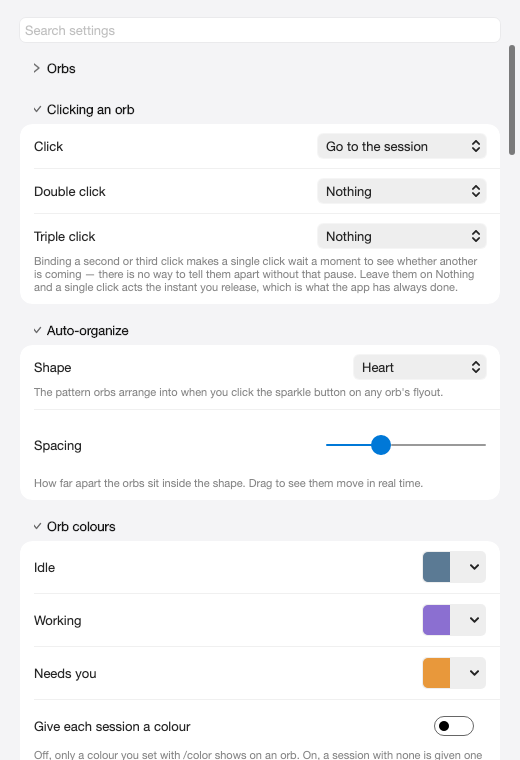
Amber means a permission prompt or a question, nothing else. An agent that has simply finished goes quiet instead of demanding attention. Pick your own state colours, how clicks behave, and the shape your orbs arrange into.
Questions
No. Orbweaver is independent software. It isn't affiliated with or endorsed by Anthropic, OpenAI, xAI or the OpenClaw project. It just watches the tools you already use.
Yes, Orbweaver was formerly Claude Buddy. It grew to cover more than one vendor's agents, so it got a name that fits.
Orbweaver reads the session files your agents already write on your own machine, and the hooks that feed it make no network calls. The optional neural voice runs entirely on your computer. The network only comes into it for features you switch on yourself, such as connecting your other machines, and no server of ours sits in that path. Draft
No. Start your agents the way you always do. Codex asks you to trust its new hook once the first time, and after that it's hands-off.
No. Amber means a permission prompt or a question, nothing else. An agent that has simply finished and is waiting for your next message goes quiet instead of demanding your attention.